One click before you leave.
macOS puts a MacBook to sleep the moment the lid shuts, halfway through a four-hour agent run or not. Nuit Blanche adds the switch macOS doesn’t have.
Click the moon
Or press ⌃⌥⌘L. It turns into a sun, and a small pop-up confirms it. Nothing else changes while the lid is open.
Close the lid
The screen goes dark and the Mac keeps working, on battery or plugged in. Set it down somewhere with air, not inside a bag.
Click the sun when you’re back
The moon comes back and your Mac sleeps on lid close, like it always did.
Say yes to the coffee.
The run you started at eleven is still going at one. Your Mac sits shut on the desk, on Wi-Fi, doing the work, and you’re two streets away with an espresso.
Agents, builds, downloads, SSH sessions and long exports all carry on with the lid down. Nothing needs to stay plugged in, and nothing needs a second screen.
It knows when to let your Mac sleep.
A laptop that never sleeps is its own problem, so Nuit Blanche keeps an eye on the clock, the battery and the heat while you’re away.
- A timer, if you want one
- Stay awake for 1, 2, 4 or 8 hours, then sleep like normal.
- A battery floor at 20%
- On battery, it lets the Mac sleep before a long run drains it flat.
- A heat cut-off
- If the battery passes 45°C or macOS reports the Mac is overheating, it lets it sleep.
- No way to forget it
- The sun stays in your menu bar while it’s on, and quitting the app puts normal sleep back.
Your agents can flip the switch themselves.
Nuit Blanche installs a small nuitblanche command. Add two lines to your CLAUDE.md or AGENTS.md and the agent keeps the Mac up while it works, then switches it off once the whole task is done.
Nuit Blanche doesn’t watch your agents, so the agent has to say when it’s finished. If it never does, the timer covers you. With the lid already shut, switching off puts the Mac straight to sleep.
~/shop-api ❯ nuitblanche on 4h
Awake with the lid closed for 4h.
~/shop-api ❯ nuitblanche status
on (3h 59m left)
~/shop-api ❯ nuitblanche off
Sleeps normally again.
When I say I’m heading out, run nuitblanche on 4h.
If you did, run nuitblanche off once the whole task is done.
-
One rule you can read
It asks for your password once, to add a single rule that lets it switch sleep on and off. Read it with
cat /etc/sudoers.d/nuitblanche. -
Never goes online
No analytics, no account, no update checks. It makes no network connections at all.
-
Puts a shut Mac to sleep
Turning sleep back on with the lid already shut doesn’t put a Mac to sleep. When the timer or the battery floor switches it off, Nuit Blanche does that part for you.
-
Leaves cleanly
Uninstall Nuit Blanche…, under Nuit Blanche in the menu, removes the rule, the command and the app.
Questions
Why not caffeinate, Amphetamine or KeepingYouAwake?
caffeinate and KeepingYouAwake stop idle sleep while the lid is open. Close the lid on battery and the Mac sleeps anyway (caffeinate -s only holds on a charger). Amphetamine can keep a closed Mac awake through its Closed-Display Mode, with an extra helper to install. Nuit Blanche does the one job: lid closed, on battery, one click.
What does it cost?
You choose the price at checkout, from $3, with $5 suggested. You pay once. There’s no subscription, and updates come with it.
Why does macOS say it can’t verify Nuit Blanche?
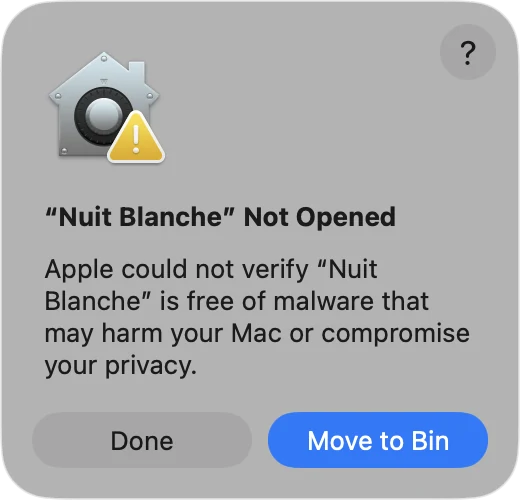
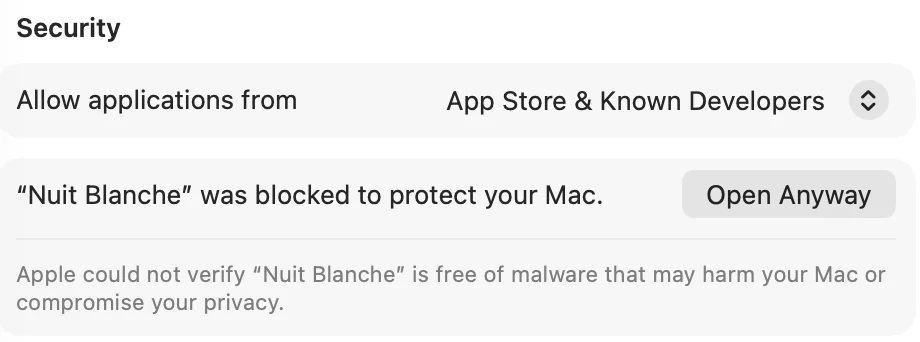
It isn’t signed with a paid Apple developer account, so macOS stops it the first time you open it. You allow it once in System Settings and it opens normally after that. Here’s how, in three pictures.
Does it need my password?
Once. Setup adds a rule in /etc/sudoers.d/ that allows exactly two commands, pmset -a disablesleep 1 and pmset -a disablesleep 0, so it can switch without asking each time. Skip it and macOS asks for your password on every switch instead. Uninstalling removes the rule.
I run several Claude Code sessions. Does one finishing put the Mac to sleep under the others?
No. Each session that runs nuitblanche on holds the Mac awake in its own name, and nuitblanche off releases that session’s hold only. With the Claude Code hooks in, the Mac sleeps ten minutes after your sessions go quiet; without them, when the last hold is gone: every session has said off, closed, or run out its time.
How long will the battery last?
As long as your agents let it. The screen goes off the moment the lid closes (macOS would leave it lit inside the closed lid for ten minutes on battery), so the battery goes to the agents. The menu shows macOS’s own estimate before you close the lid, 36% battery, about 5h 19m at this rate, agents can read the same number with nuitblanche status --json, and the Mac sleeps at 20% unless you untick that guard. Turning it on at 30% or less says so.
What happens when it goes offline?
By default, nothing: it stays awake until the timer, the battery floor or your agent’s off. Tick Offline for 15 minutes under Sleep anyway if in the menu and it sleeps after 15 minutes with no network, since agents that need an API are stalled anyway. Agents can see online in status --json and decide for themselves.
Can I check on it from my phone?
Yes, over SSH on your phone’s hotspot. Turn on Remote Login on the Mac and make an iPhone Shortcut that runs nuitblanche status: it shows what’s holding the Mac awake and the battery. A second Shortcut with nuitblanche off --all puts it to sleep from the bag. The recipe is here.
Will it cook my laptop?
A closed MacBook doing heavy work runs warm, with less air than when it’s open. Put it down on a desk, a table or a car seat. Don’t zip it into a bag while it works. If the battery passes 45°C or macOS reports the Mac is overheating, Nuit Blanche lets it sleep.
Which Macs does it run on?
It’s tested on macOS 26 Tahoe on an Apple silicon MacBook. It’s built for macOS 13 Ventura or later, on Apple silicon and Intel, but older macOS versions and Intel Macs haven’t been tried yet, so if it misbehaves on yours, reply to your receipt email. On a desktop Mac it simply keeps the machine from sleeping.
What if I restart or quit the app?
Quitting puts normal sleep back, and so does logging out or restarting. If the Mac crashes or loses power while it’s on, Nuit Blanche switches the setting off the next time it starts.
How do I get it after paying?
The download is on the page right after checkout. Polar, the shop that takes the payment, also emails you a link so you can download it again later.
Opening it the first time
Nuit Blanche isn’t signed with a paid Apple developer account, so macOS blocks it the first time you open it. You only do this once.
The Open Anyway button shows for about an hour after you try to open the app. If it’s gone, open Nuit Blanche again and it comes back.
-
Open Nuit Blanche and click Done.
-
Open System Settings › Privacy & Security. Scroll down to Security and click Open Anyway.
-
Confirm with your password, then click Open.
Close the lid tonight.
Pay what you want, from $3.
You pay once, and updates come with it.
macOS 13 or later. Tested on macOS 26 with Apple silicon.